Bulk Forge
The table module for bulk work: every row is a job, every batch is a run.
boostN.ai
App / Solutions / Bulk Content Production
Bulk Forge runs your content production as a batch — row by row, with infinite agents in parallel. You watch the work happen instead of typing it yourself.
The problem
1000 articles? With classic AI chats that means: write 1000 briefings, open 1000 chats, explain the same context 1000 times, collect 1000 results. The AI is fast. The bottleneck is you.
boostN flips this: you define once how a good article is made — structure, tone, sources, quality gates. From then on, every production run is just a table: one row per article, one batch per campaign.
Who is this for?
A look inside
This is where the batch lives: tabs per content type, every row a briefing, live status throughout.
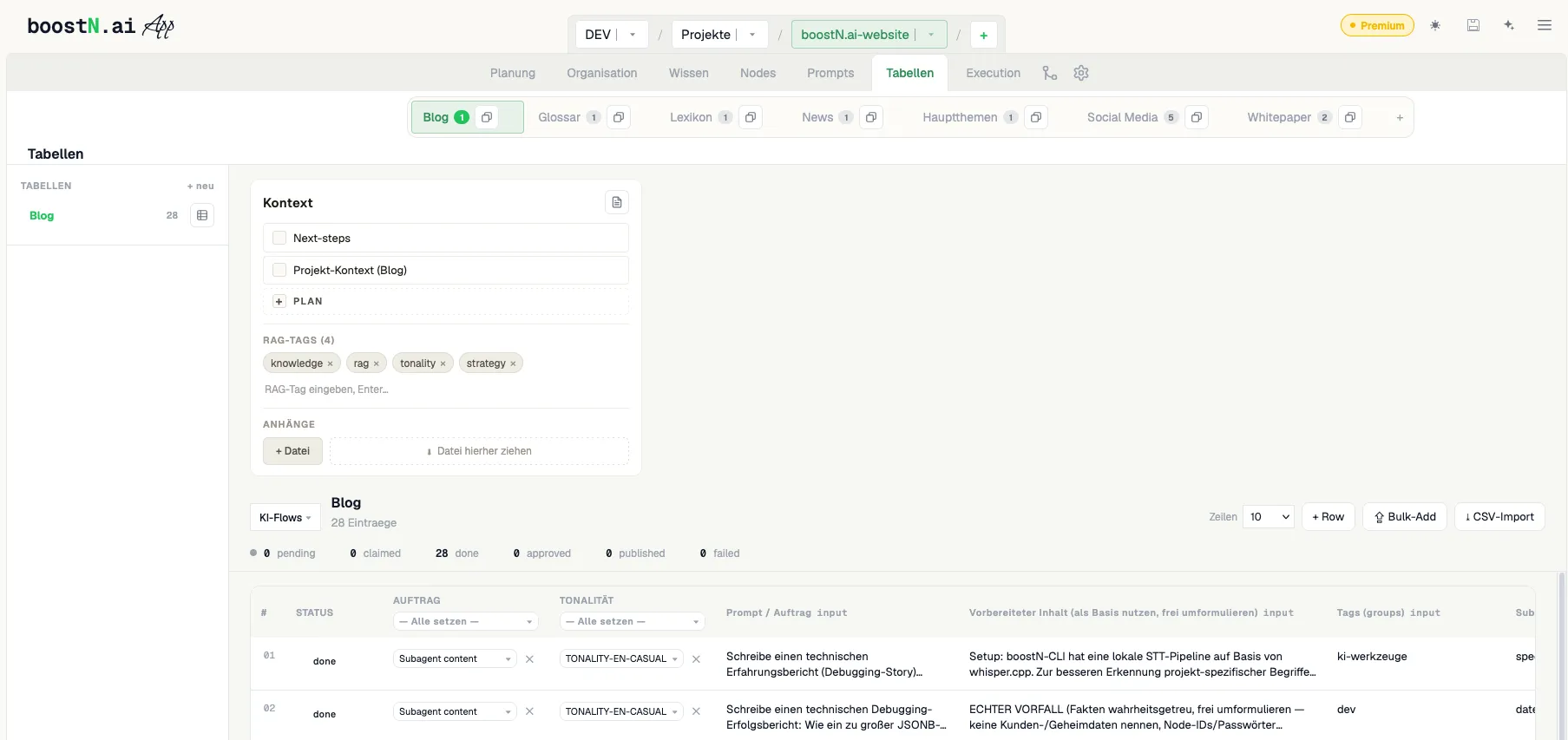
one table, one campaign
even while you sleep
reuse the template as often as you like
How it works
Set it up once, then produce in series. The flow is deterministic: row 1 runs through exactly the same workflow as row 1000.
Import a CSV or sheet — every row becomes a standalone briefing with keyword, intent and audience.
Structure, tone, sources, lengths: defined once in the Prompt Flow, applied to the whole batch.
Bulk Forge works through the table in parallel — with live status per row. You always see where the batch stands.
Spot-check results, approve or send rows back — then push them live to your website via adapter, or export as Markdown/HTML.
What you get
The table module for bulk work: every row is a job, every batch is a run.
Deterministic workflows instead of prompt roulette — same quality at row 1 and row 1000.
Research, writing, done, error: you watch the batch like a dashboard, not a black box.
Anthropic, OpenAI, Google, self-hosted or local LLM — use your existing subscription or our services.
Checks between steps: facts, length, style. Anything that fails does not move on.
Approved rows land straight in your website database via adapter — shop, WordPress or custom pipeline. At the press of a button or fully automated through the execution engine.
No — that is exactly what templates and quality gates are for. Every row runs through the same defined workflow with the same checks. Scale comes from parallelism, not shortcuts.
You can use your existing accounts (Anthropic, OpenAI, Google, self-hosted) — or our services. Your limits, your cost control.
Anything you can describe as a template: blog articles, product copy, glossaries, meta descriptions, translations, social posts.
Every row is its own briefing with its own keyword, its own research and its own structure. The template governs the form, not the content.
Via publish adapter: the execution engine pushes approved rows straight into your system — e-commerce shop, WordPress, headless CMS or your own Node.js pipeline. boostN does not care about the stack, it only needs the connection. Or export classically as Markdown or HTML.
boostN is not available yet — early access starts soon. Follow us on LinkedIn or X: every follower receives a personal invite and is in when early access launches.
boostN™ — AI-Orchestration for everyone.
Release soonEveryone who follows us at release receives a personal invite to the early access.