Claude Code: How to enable Fast Mode for Opus 4.6 — and what it costs
Anyone who wants to keep working with Opus 4.6 in Claude Code and use the faster “Fast Mode” has been hitting a new wall for a few weeks: since the official launch in February 2026, Fast Mode is extra-usage only — it no longer runs against your normal plan allowance. This guide shows how to enable it, how to read the warning when you can’t, and what Fast Mode actually costs.
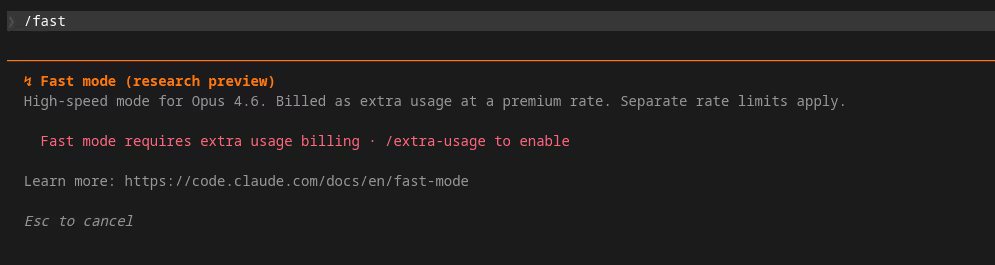
Many users see this warning for the first time
Fast Mode is locked until extra usage is on.
Type /fast in Claude Code without enabling extra usage first, and this is the message you get. Before the Opus 4.7 release Fast Mode ran inside your normal plan allowance — today it's tied to extra usage and billed at six times the standard rate.
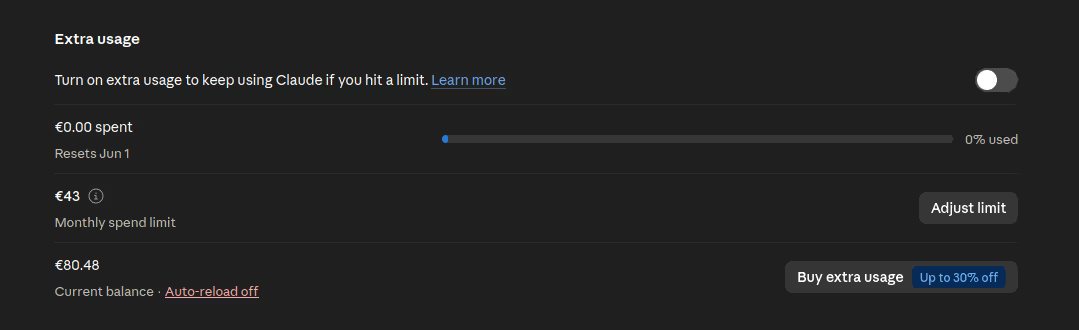
This is the switch the CLI means
What the CLI demands, you turn on here in the web account.
In your Anthropic account under Plans & billing sits the toggle the CLI warning refers to. Only once it's on can Fast Mode be used via /fast. Right next to it you can set a monthly cap — recommended, so an accidentally-left-on Fast Mode can't run up unexpected costs.
Fast Mode = 6× standard pricing
Fast Mode is billed at $30 / MTok input and $150 / MTok output — six times the regular Opus 4.6 API rate ($5 / $25). Without extra usage enabled, nothing happens; with extra usage enabled, every Fast Mode token goes exclusively to extra usage, never to plan limits.
What Fast Mode actually is
Fast Mode is an Anthropic beta feature that delivers Opus 4.6 responses at significantly higher output speed. Under the hood it routes inference through a faster pipeline — the model itself is still Opus 4.6, just with much higher throughput per second. Anthropic positions Fast Mode as a help for long sessions with many small iterations, where wait time adds up.
The catch: that speed costs. Fast Mode runs on a separate compute pool, and every token there is billed at a premium tier. Anthropic launched Fast Mode in February with a 50% promo (3× instead of 6× standard), which expired on February 16, 2026. Since then: full premium pricing.
How to enable Fast Mode
Two stages have to line up — otherwise Claude Code refuses:
Stage 1 — turn on extra usage. In your Anthropic account under “Plans & billing” there’s a toggle: “Turn on extra usage to keep using Claude if you hit a limit.” As long as it’s off, Fast Mode simply won’t run — regardless of subscription level. The monthly extra-usage limit can be set right next to it.
Stage 2 — enable Fast Mode in the CLI. In Claude Code:
/fastIf extra usage from stage 1 isn’t active, the CLI replies with the warning shown in the screenshot above: “Fast mode requires extra usage billing · /extra-usage to enable”. In that case, run first:
/extra-usageThis opens a confirmation dialog that explicitly states: from now on, any request can consume beyond your plan allowance. After confirming, /fast is available.
What changed compared to before
Anyone who used Claude Code before the Opus 4.7 release in April 2026 remembers a different state: Opus 4.6 was directly selectable in the model picker, Fast Mode ran inside normal token allowances, and “extra usage” was a footnote in the help docs. With the Opus 4.7 launch, Anthropic changed several things at once:
- Opus 4.6 disappeared from the standard picker (see GitHub Issue #49689). The Desktop Code tab only shows “Opus” — and that resolves to 4.7.
- Fast Mode runs through extra usage only, no longer against plan allowances. Even Pro/Max subscriptions count Fast Mode tokens to the extra-usage counter by default.
- Opus 4.7 ships a new tokenizer that produces up to 35% more tokens for the same text. Switching from 4.6 to 4.7 burns plan limits faster — which adds pressure to enable Fast Mode (and therefore extra usage).
These three changes shipped without much public announcement. Documentation exists in the official pricing and Fast Mode docs, but anyone who only uses the picker and doesn’t read release notes only finds out when the CLI warning shows up.
When Fast Mode pays off — and when it doesn’t
Fast Mode is not a “use it always” feature. It makes sense for short, iterative loops: many small back-and-forth requests where wait time breaks the flow. There the per-token premium is acceptable because most replies are short.
Where Fast Mode rarely pays off is on long outputs — refactoring waves, documentation generation, large code generation tasks. The model produces lots of output tokens, and exactly those become expensive at premium rates ($150 / MTok instead of $25). For those tasks, plain standard Opus 4.6 is much cheaper.
Rule of thumb: Fast Mode on while you’re actively ping-ponging with the CLI — Fast Mode off the moment you fire off a long task and won’t read the output for 30 seconds anyway.
Turning Fast Mode off again
/fast is a toggle. Run it again and it switches off. Extra usage itself can be deactivated in the Anthropic account at any time — once the toggle is off, both Fast Mode and any other over-limit usage are blocked. As a safety net, set a monthly cap under extra usage explicitly (e.g. €43 in the screenshot), so an accidentally-left-on Fast Mode can’t run up an unwanted bill.
Background on the pricing change
Moving Fast Mode into extra usage is part of a broader shift in Anthropic’s billing model. We summarized what exactly changed and why in a separate news piece: → Anthropic changes its extra usage settings