Daybreak Blue: Security access to GPT-5.6 Sol explained
Daybreak Blue — what exactly is behind it
Daybreak Blue is not its own AI model, and it’s not a specially trained security version of GPT either. It’s an approval-gated access tier in OpenAI’s Daybreak program. Behind it run general frontier models with safeguards that are calibrated differently for authorized defensive cybersecurity work.
The simplest technical proof is the API mapping: the alias gpt-daybreak-blue-latest currently points to GPT-5.6 Sol. So using Daybreak Blue doesn’t automatically get you a smarter Sol. The base model stays the same. The difference lies mainly in system-side cyber filters catching fewer legitimate security requests.
The short version
Your assumption hits the core: Daybreak Blue is currently essentially Sol with more room for authorized defensive security work. “More permissions” works as shorthand. More precisely, it’s reduced refusals and differently calibrated safeguard layers — not a blanket clearance for arbitrary offensive actions.
Since when has Daybreak Blue existed?
The overarching Daybreak program launched on June 22, 2026. Back then OpenAI bundled Codex Security, GPT-5.5-Cyber, the partner program and the open-source initiative Patch the Planet, among others.
The Daybreak Blue access tier has existed since August 10, 2026. On that day, OpenAI split Daybreak into two tiers:
- Daybreak Blue for most authorized defenders and everyday defensive tasks.
- Daybreak Red for more dual-use-heavy work such as advanced vulnerability research, exploit validation and red teaming.
The distinction matters, because “Daybreak” is older than “Daybreak Blue.” Anyone asking about Blue’s release therefore lands on August 10 and not on the start of the overall program in June.
Daybreak Blue vs GPT-5.6 Sol: what actually changed
The honest answer up front: surprisingly little. Daybreak Blue and public GPT-5.6 Sol are, for the most part, the same model. Blue doesn’t make Sol smarter, faster or better at security work. It relaxes a set of system-side cyber guardrails by a small margin, so the model refuses fewer clearly defensive requests. That’s the whole difference.
Public Sol is constrained by several safeguard layers. That’s tricky with security requests: a legitimate investigation can look technically similar to an attack. Analyzing an authentication bypass, malware analysis or checking a privilege escalation are classic dual-use tasks — and normal Sol often aborts them as a precaution.
According to OpenAI, Daybreak Blue removes the additional system-side cyber guardrails that filter such requests. This is meant to make Sol bail out less often on clearly defensive tasks. OpenAI names these use cases:
- finding and prioritizing vulnerabilities
- reviewing secure code
- analyzing malware
- investigating and containing incidents
- developing and validating patches
- documenting security assessments
How big is the gap in numbers? Small. In OpenAI’s own Advanced Cybersecurity Completion Rate — a set of deliberately high-risk test requests — normal Sol completed 1.5 percent, and Sol via Daybreak Blue 2.0 percent. That is roughly half a percentage point of extra headroom, not a new capability tier. For contrast, the purpose-trained GPT-5.6-Cyber behind Daybreak Red reached 95 percent on the same benchmark. So Blue is not “a security model” — it’s the same Sol with a slightly wider lane for authorized defensive work.
And not all boundaries disappear. The model can still refuse particularly risky requests, data handling stays the same, and the numbers above measure willingness to take on selected dual-use tasks — not the quality of a security audit.
Access and security framework
Daybreak Blue is not automatically enabled with a normal ChatGPT or API plan. Individuals and organizations have to apply and are vetted. OpenAI ties access to identity verification, account security, monitoring, usage restrictions and legal attestations, among other things.
In the API, Blue is enabled per project by an organization admin. For Codex, a Daybreak switch may appear depending on the approved access path; with an API key you can use the alias gpt-daybreak-blue-latest. A dedicated entry named “Daybreak Blue” does not have to show up in the model picker.
That doesn’t automatically change data handling. Trusted Access, Zero Data Retention and contractual data-protection options are separate settings. For productive security work, the most important boundary also stays the same: you may only test systems you own or are explicitly authorized to investigate.
How to get access to Daybreak Blue
Access to the Daybreak Blue program is not a checkbox in your account settings — it runs through a real identity check. In short: you apply, you prove who you are with an official ID document, OpenAI matches and stores that data, and only then does it authorize your account for the reduced-refusal cyber lane.
Concretely, the verification flow looks like this:
- Start verification. From the Daybreak page you begin the identity check. OpenAI states plainly that you need an official ID document and have to meet the program’s participation and security requirements.
- Scan an official ID document. A passport, national ID card, driver’s license or — for organization access — a company credential is fully scanned. The vetting is handled through an identity-verification provider, not by uploading a file into the chat.
- Scan your face. On top of the document, a live face scan (liveness / selfie check) is captured so the provider can match the person to the document.
- Get matched and stored. Everything is compared against the document and retained for the authorization. Once it clears, your Daybreak access is active and you can jump into Codex or use the
gpt-daybreak-blue-latestalias.
Think about what you're handing over
This is a genuine data-protection decision, not a formality. To get unlocked you hand a third-party verifier a full scan of your passport or ID, possibly a company card, and a scan of your face — all matched and stored. For a marginal 0.5-percentage-point gain in completion rate (see above), weigh carefully whether that trade is worth it for your use case. It’s separate from Trusted Access, Zero Data Retention and contractual data-protection settings, which you configure on their own.
The screenshots below walk through the states you’ll see: the refusal you hit on a locked-down model, the Daybreak verification start, the confirmation once your access is live, and Daybreak Blue selected in the composer.
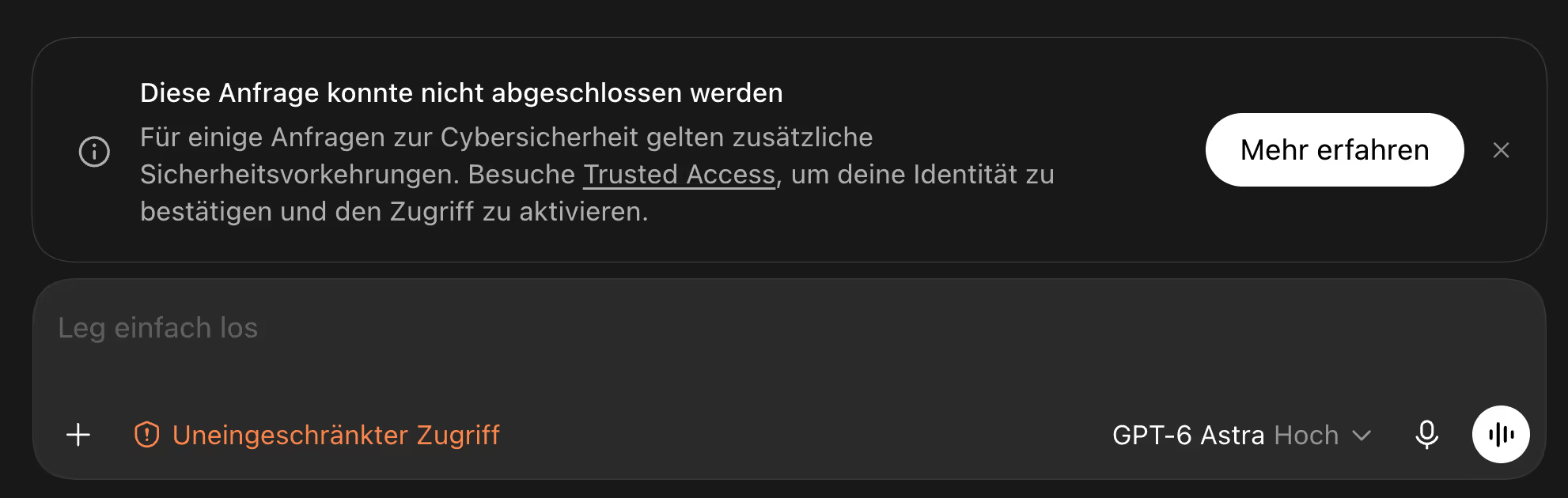
Without access: the model refuses and points to Trusted Access
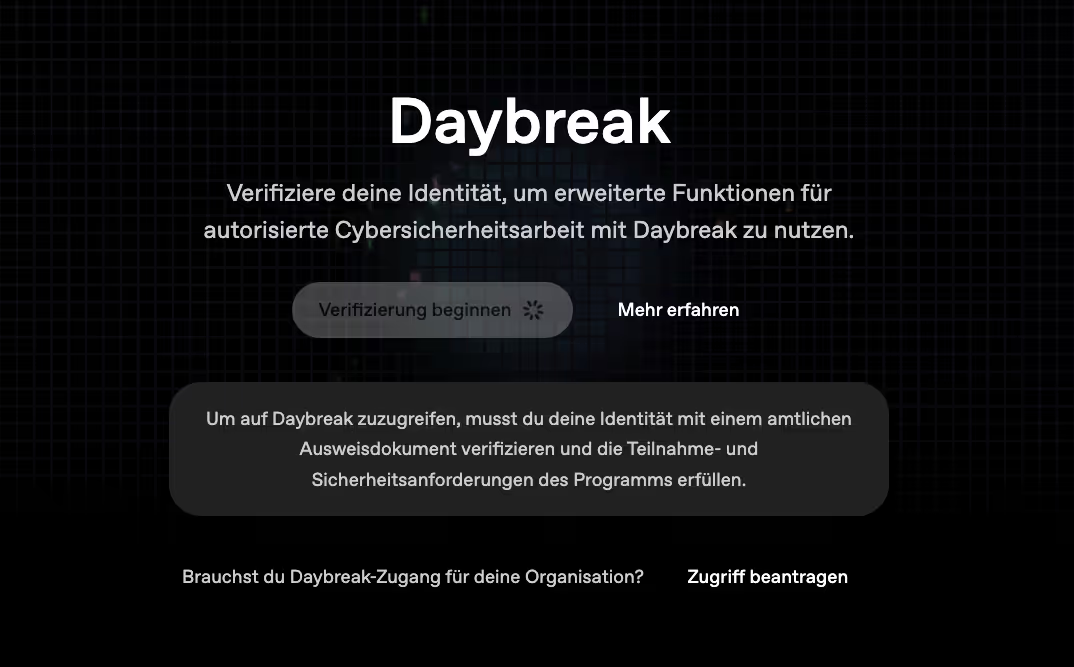
Start of verification: an official ID document is required
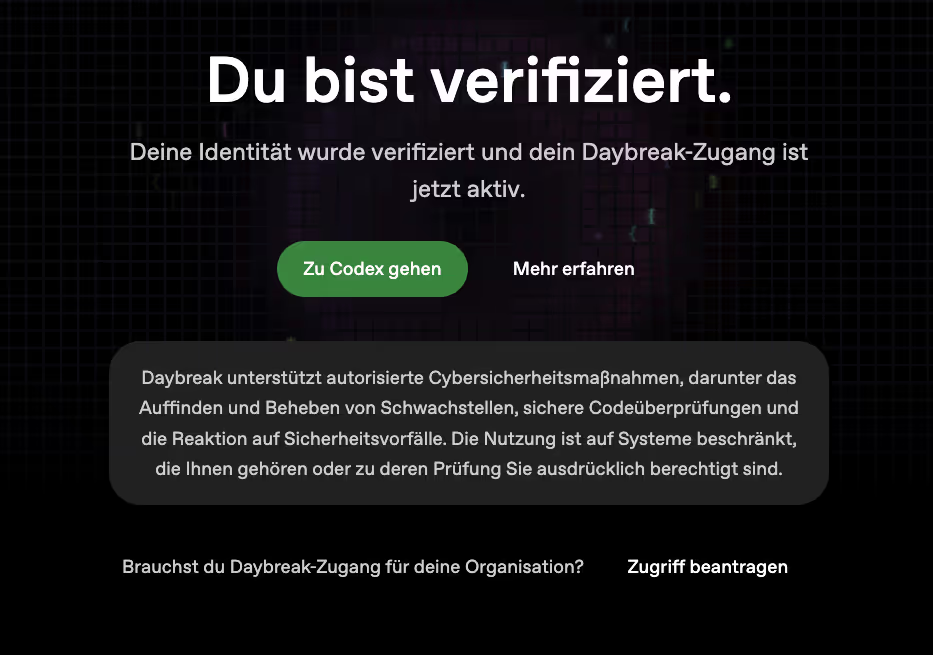
Verified: Daybreak access is active — continue to Codex
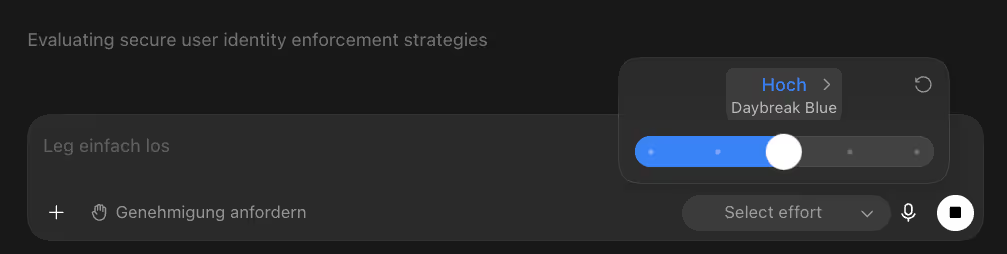
Daybreak Blue selected in the composer, with effort level and approval request
Daybreak Blue compared to Fable 5.1 and Astra
| Offering | What it is | Security classification | Typical use | |---|---|---|---| | Daybreak Blue | Access tier, currently aliased to GPT-5.6 Sol | Fewer system-side refusals for approved defensive work | Code review, incident response, malware analysis, patch validation | | Claude Fable 5.1 | Standalone general frontier model from Anthropic | No equivalent Daybreak access; the provider’s normal safety rules | Coding, long agent runs, general knowledge work | | GPT-6 Astra | Standalone newer OpenAI model | Classified by OpenAI as its first model with Critical-tier cyber capability | Complex agentic work, computer use, especially demanding cyber tasks under strict limits | | Daybreak Red | Separate, stricter access tier | Access to purpose-trained GPT-5.6-Cyber with far fewer refusals on high-risk dual-use tasks | Exploit validation, advanced vulnerability research, red teaming |
The comparison is therefore not “which of the three models wins?” It mixes two different layers: Fable 5.1, Sol and Astra are models; Daybreak Blue is an access and safety profile.
Compared to Fable 5.1, Daybreak Blue is not a broadly more capable alternative. For general coding or long agent tasks you compare Fable 5.1 with Sol or Astra. Only when defensive security requests get stuck on safety filters does Daybreak access become its own selection criterion.
Compared to Astra, the distinction is even more important — and it’s the question most people actually have: for a real security problem, do I talk to Astra or to Daybreak Blue? According to OpenAI, Astra is far more capable than Sol at vulnerability analysis and exploit development and reaches the highest cyber risk tier of the Preparedness Framework. But more capability comes with tighter controls: on OpenAI’s cyber jailbreak evaluations Astra refuses around 91.5 percent of those requests, versus about 59 percent for public Sol. Astra is the stronger brain, but by default the more locked-down one.
That doesn’t make Daybreak Blue “Astra without limits” either. OpenAI’s current support documentation says explicitly that reduced refusals on Astra are available to Daybreak Red customers, not to Daybreak Blue customers. So on Blue you get two realistic paths: a more permissive but less capable Sol (via Blue), or a more capable Astra running with its full standard safeguards. The reduced-refusal, high-capability combination — Astra with fewer refusals — sits behind Daybreak Red, not Blue.
Practical rule of thumb for a real security task: if the blocker is that a clearly authorized, defensive request keeps getting filtered, Daybreak Blue (Sol) is the pragmatic pick — it’s the lane built exactly for that. If the blocker is raw analytical capability — deep vulnerability analysis, complex agentic reasoning — reach for Astra and accept that it will refuse more at the edges. Only genuine offensive research (exploit chains, red teaming) justifies applying for Daybreak Red with GPT-5.6-Cyber. For most defenders, that means: Blue for reach, Astra for depth, Red for the sharp end.
Which option fits what?
For normal software development: pick Fable 5.1, Sol or Astra by quality, cost and workflow. Daybreak Blue brings no general performance boost.
For defensive security in your own code: Daybreak Blue is the obvious OpenAI option when normal models bail out too often on clearly authorized reviews. Sol remains the underlying model.
For maximum cyber capability: Astra is the stronger general model, but its Critical classification leads to stricter controls right now. More capability here doesn’t automatically mean more allowed answers.
For exploit research and red teaming: Daybreak Red is the more fitting program logic. It runs GPT-5.6-Cyber, a model trained specifically for security. Access is separate and more tightly limited.
What Daybreak Blue does not replace
Fewer refusals don’t turn a model into a responsible security auditor. It can miss vulnerabilities, misjudge exploitability or recommend a patch that opens a new gap elsewhere. OpenAI itself recommends clearly bounded goals, isolated environments, monitored tool calls and human approvals.
In practice that means: Daybreak Blue is a tool for taking legitimate investigations deeper technically. It is neither a security certification nor permission to test other people’s systems. For production-critical, regulated or forensic cases, a qualified human stays accountable.
FAQ
- You apply and get vetted. Access runs through an identity check: you verify yourself with an official ID document (passport, national ID or driver’s license), add a live face scan, and OpenAI matches and stores that data before authorizing your account. Only then does the reduced-refusal cyber lane switch on.
- An official photo ID such as a passport, national ID card or driver’s license — for organization access possibly a company credential as well — plus a live face/liveness scan so the verifier can match the person to the document. The check runs through an identity-verification provider, not by uploading a file into the chat.
- No. The alias gpt-daybreak-blue-latest currently points to GPT-5.6 Sol. Daybreak Blue is an access and safety profile, not its own model — it only removes some system-side cyber guardrails so Sol refuses fewer clearly defensive requests.
- Minimal. On OpenAI’s Advanced Cybersecurity Completion Rate, normal Sol completed 1.5 percent of deliberately high-risk test requests and Sol via Daybreak Blue 2.0 percent — about half a percentage point. It is the same model with slightly relaxed cyber guardrails, not a capability jump.
- Use Daybreak Blue (Sol) when clearly authorized, defensive requests keep getting filtered — that is the lane built for it. Use Astra when you need raw analytical capability and can accept more refusals at the edges; on Blue, Astra runs with its full standard safeguards. Reduced-refusal Astra is a Daybreak Red benefit, not a Blue one. Genuine offensive research belongs on Daybreak Red with GPT-5.6-Cyber.
- It is a real trade-off: you hand a third-party verifier a full scan of your ID, possibly a company card, and a scan of your face — all matched and stored — for a marginal gain in completion rate. Weigh that against your use case. It is separate from Trusted Access, Zero Data Retention and contractual data-protection settings, which you configure on their own.